

ADA: Americans with Disabilities Act
The Americans with Disabilities Act (ADA) is the United States' foundational civil rights law for people with disabilities, and it increasingly shapes how businesses build and maintain their websites.
ADA Requirements for Businesses in the United States
The Americans with Disabilities Act was signed into law in 1990 to prohibit discrimination against people with disabilities across employment, public services, and places of public accommodation.
Title III of the ADA extends that protection to places of public accommodation, and courts have increasingly interpreted that to include business websites and mobile apps.
Unlike Germany's BFSG, the ADA does not contain a specific website accessibility statute with named technical requirements. Instead, the DOJ and federal courts have repeatedly cited WCAG 2.1 Level AA as the practical benchmark.
For state and local government entities, a 2024 DOJ rule under Title II requires government websites and mobile apps to conform to WCAG 2.1 Level AA, with extended deadlines through 2027–2028.
“An accessible website isn't just about avoiding a lawsuit. It's about making sure a blind customer, a customer with motor impairments, or someone browsing on a screen reader can actually buy what you're selling.”
ADA → Title II vs. Title III → Practical Standard
ADA (1990)
Federal civil rights law prohibiting discrimination based on disability across public life.
Title II
State and local government services; 2024 DOJ rule requires WCAG 2.1 AA.
Title III
Private businesses open to the public, including websites; enforced through litigation.
WCAG 2.1 Level AA
The technical benchmark courts and the DOJ consistently reference.
DOJ Enforcement
Department of Justice guidance and enforcement actions shape private sector expectations.
Who Does the ADA Apply To?
The ADA applies broadly to businesses that operate as places of public accommodation serving the public in the United States.
Businesses That Must Comply
- Online retailers and e-commerce stores selling to U.S. consumers
- Banks, credit unions, and financial service websites
- Hotels, airlines, and travel booking platforms
- Restaurants, healthcare providers, and other consumer-facing service businesses
- Streaming, media, and entertainment platforms
- Any business operating a public-facing website or app in the U.S.
Exemptions and Gray Areas
- Religious organizations: generally exempt from ADA Title III obligations
- Private clubs: not open to the general public, typically exempt
- Very small or purely informational sites: lower litigation risk, but no blanket statutory exemption
Note: Unlike the BFSG, the ADA has no microenterprise carve-out for private businesses. Size and revenue do not automatically exempt a company.
Key Compliance Considerations
There is no single nationwide deadline for private businesses under Title III. Litigation risk exists right now.
| Requirement | Deadline / Status |
|---|---|
| State & local government sites, large entities (50,000+ population) | April 26, 2027 |
| State & local government sites, small entities & special districts | April 26, 2028 |
| Private business websites (Title III) | No fixed federal deadline; risk applies now |
| New or actively updated commercial websites | Courts increasingly cite WCAG 2.1 AA |
Penalties and Legal Risk for Non-Compliance
Ignoring ADA web accessibility exposes a business to real financial and reputational risk, largely driven by private lawsuits.
Civil Penalties
DOJ-set penalties reach $75,000 for first-time violations and $150,000 for repeat offenses.
Private Lawsuits
Non-compliance can result in costly settlements, attorneys' fees, and injunctive relief.
Injunctive Relief
Courts can order a business to fix its website and maintain accessibility going forward.
Repeat Litigation
Businesses that settle once without making real fixes often face repeat claims.
Brand Damage
Public accessibility complaints and lawsuits are highly visible and can erode customer trust.
What ADA Compliance Requires for Websites
Courts and the DOJ reference WCAG 2.1 Level AA as the practical benchmark for ADA website accessibility.
Alternative Text
All images, icons, and non-text content must have descriptive alt text for screen readers.
Captions & Transcripts
Videos must include accurate captions and, where possible, full transcripts.
Resizable Text
Content must remain usable when text is enlarged without breaking layout.
Color Contrast
Minimum 4.5:1 contrast ratio for normal text; 3:1 for large text.
ADA vs. Other Accessibility Standards
| Standard | Region | Applies To | Technical Baseline |
|---|---|---|---|
| ADA (Title III) | USA | Private businesses, public accommodations | WCAG 2.1 AA (court-referenced) |
| ADA (Title II) | USA | State & local government entities | WCAG 2.1 AA (2024 DOJ rule) |
| Section 508 | USA | Federal agencies and contractors | WCAG 2.0 AA / EN 301 549 |
| BFSG | Germany | Private sector B2C businesses | WCAG 2.1 AA (via EN 301 549) |
| EAA (EU 2019/882) | EU | All EU member states | EN 301 549 / WCAG 2.1 AA |
| WCAG 2.1 AA | Global | Referenced by most national laws worldwide | The standard itself |
ADA Compliance Checklist
Content Accessibility
- All images have appropriate, descriptive alt text
- Videos include captions and transcripts
- PDFs and downloadable documents are accessible
- Headings used in logical hierarchical order
- Color is not the only means of conveying information
Visual Design
- Text-to-background contrast meets 4.5:1 minimum
- Large text meets 3:1 contrast ratio
- Content remains usable when text is enlarged
- Focus indicators are clearly visible for keyboard users
Navigation & Interaction
- All interactive elements are reachable via keyboard
- Skip navigation links added to bypass menus
- No keyboard traps anywhere on the site
- Navigation consistent across all pages
Forms & Technical
- All form fields have visible descriptive labels
- Error messages identify the problem and the fix
- Page language is defined in HTML
- Accessibility statement published on the site
Meet ADA Expectations with One Accessibility
One Accessibility helps website owners work toward WCAG 2.1 AA, the standard courts and the DOJ consistently point to under the ADA.
- Works with Elementor, Gutenberg, Bricks, Beaver Builder, Divi, WPBakery
- Smart conditional presets for different pages
- Visual drag-and-drop editor, no coding required
- Default accessibility preset activates instantly on installation
- Built around WCAG 2.1 AA, referenced under ADA Title II and III
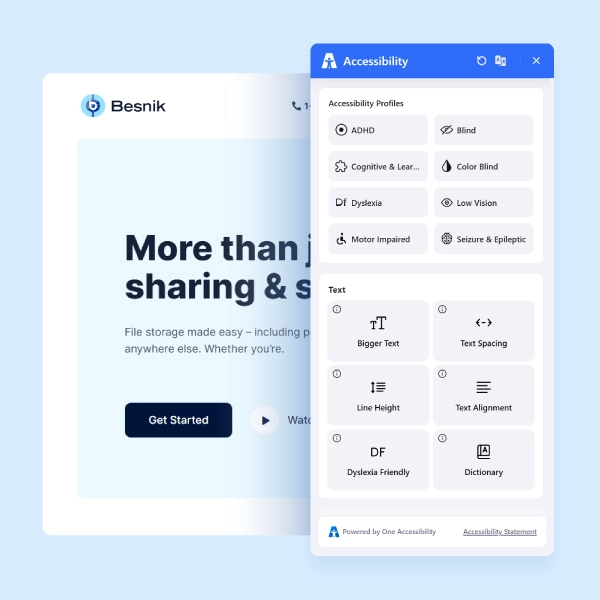
Text Resizing
Visitors can increase or decrease text size to their comfortable reading level.
High Contrast
Toggle high contrast mode for users with visual impairments or light sensitivity.
Keyboard Navigation
Enhanced keyboard navigation for users who cannot use a mouse.
Screen Reader Ready
Compatible markup for JAWS, NVDA, VoiceOver, and other screen readers.
Reading Mask
A reading guide overlay that helps users with dyslexia follow lines of text.
Instant Activation
Default preset activates on install; your site improves accessibility immediately.
Make Your WordPress Site ADA-Ready
Join thousands of sites using One Accessibility to meet global accessibility standards — no coding required.