


WCAG 2.2: Web Content Accessibility Guidelines
WCAG 2.2 is the current international standard for web accessibility, published by the W3C in October 2023. If your website serves a public audience, meeting WCAG 2.2 Level AA is the technical baseline required by the EAA, ADA, AODA, BFSG, and Section 508.
WCAG 2.2 Requirements for WordPress Websites
The Web Content Accessibility Guidelines (WCAG) are developed by the World Wide Web Consortium (W3C) through its Web Accessibility Initiative (WAI). WCAG 2.2 became the official W3C recommendation on October 5, 2023, adding nine new success criteria.
WCAG 2.2 is not a replacement for earlier versions. It builds on top of WCAG 2.1 and is fully backward compatible. Any site that meets WCAG 2.2 AA automatically satisfies WCAG 2.1 AA and WCAG 2.0 AA as well.
WCAG 2.2 is a technical standard, not a law. However, it is the standard referenced by accessibility laws in virtually every major jurisdiction worldwide.
“WCAG 2.2 represents five years of feedback from accessibility auditors, developers, and people with disabilities. It addresses real barriers that earlier versions left unresolved.”
The Nine New Success Criteria in WCAG 2.2
Six of the nine new criteria affect Level A and AA compliance — the levels most organizations are legally required to meet.
3.2.6 Consistent Help
Help mechanisms must appear in the same location on every page (Level A).
3.3.7 Redundant Entry
Users must not re-enter the same information in a single session (Level A).
2.4.11 Focus Not Obscured
Focused elements must not be completely hidden by sticky headers or overlays (Level AA).
2.5.7 Dragging Movements
Drag-and-drop must have a single-pointer alternative (Level AA).
2.5.8 Target Size
Interactive elements must meet 24×24 CSS pixel minimum target size (Level AA).
3.3.8 Accessible Authentication
Authentication must not require cognitive tests without an accessible alternative (Level AA).
Who Does WCAG 2.2 Apply To?
WCAG 2.2 defines what technical compliance looks like for any website subject to digital accessibility law.
Organizations That Should Meet WCAG 2.2
- All public sector websites and digital services, globally
- Private sector businesses subject to the EAA, ADA, BFSG, or AODA
- E-commerce stores, SaaS platforms, and consumer-facing digital services
- Educational institutions, healthcare providers, and nonprofits
- Any website targeting users in the EU, US, UK, Canada, or Australia
- Mobile apps and web applications, not just desktop websites
Conformance Levels
- Level A: Minimum baseline — 32 criteria covering the most critical barriers
- Level AA: Standard target for legal compliance worldwide — 56 criteria total (A + AA)
- Level AAA: Highest level — 87 criteria total; rarely mandated by law
- Levels are cumulative: Level AA includes everything from Level A
WCAG 2.2 Conformance Levels at a Glance
Meeting Level AA means satisfying all 56 success criteria at Levels A and AA combined.
| Level | Criteria Count | What It Means | Legally Required? |
|---|---|---|---|
| Level A | 32 criteria | Removes fundamental access barriers | Minimum in most laws |
| Level AA | 24 additional (56 total) | Standard accessibility for most users | Yes, in most jurisdictions |
| Level AAA | 31 additional (87 total) | Enhanced accessibility for specialized needs | Rarely mandated |
Why WCAG 2.2 Compliance Matters
While WCAG itself carries no penalties, laws referencing it impose substantial fines, lawsuits, and market restrictions for non-compliance.
Legal Liability
ADA, EAA, BFSG, AODA, and other laws reference WCAG — non-compliance triggers enforcement.
Lost Revenue
Inaccessible sites exclude 15–20% of potential users including people with disabilities.
SEO Impact
Accessible sites tend to rank better — accessibility best practices align with Google's ranking factors.
Procurement Exclusion
Government and enterprise buyers increasingly require WCAG conformance in RFPs.
Reputational Risk
Public accessibility failures damage brand trust and customer loyalty.
What WCAG 2.2 Compliance Requires for Websites
WCAG 2.2 is structured around four core principles. Every success criterion belongs to one of these categories.
Text Alternatives
All non-text content must have descriptive text alternatives for screen reader users.
Captions and Transcripts
Pre-recorded audio and video must include accurate captions and audio descriptions.
Adaptable Content
Content must be presentable in multiple ways without losing meaning.
Color Contrast
Normal text must meet 4.5:1; large text requires 3:1 minimum.
WCAG 2.2 vs. Other Accessibility Standards
| Standard | Published | Total Criteria | Key Focus | Referenced By |
|---|---|---|---|---|
| WCAG 2.0 | 2008 | 61 | Core POUR principles | AODA, Section 508 |
| WCAG 2.1 | 2018 | 78 (+17) | Mobile, low vision, cognitive | ADA, EAA, BFSG, AODA |
| WCAG 2.2 | 2023 | 87 (+9, -1) | Cognitive, motor, authentication | EAA (EN 301 549), ADA |
| WCAG 3.0 | In development | TBD | Broader scope, new model | Not yet referenced |
WCAG 2.2 Website Compliance Checklist
Content and Media
- All images have meaningful, descriptive alt text
- Videos have accurate captions and transcripts
- Audio content has a text alternative
- PDFs accessible or available in accessible format
- Headings in correct hierarchical order
- Page language defined in HTML
Visual Design
- Text contrast meets 4.5:1 minimum
- Large text meets 3:1 contrast ratio
- Content usable at 200% browser zoom
- Color not the only means of communicating information
- Focus indicators visible for keyboard users
- [2.2] Focused elements not hidden behind sticky headers (2.4.11)
Navigation and Keyboard
- All interactive elements reachable via keyboard
- Skip navigation link present
- No keyboard traps anywhere on the site
- Navigation consistent across all pages
- Page titles unique and descriptive
- [2.2] Target sizes meet 24×24 CSS pixel minimum (2.5.8)
Forms and Authentication
- All form fields have visible, associated labels
- Error messages identify issue and suggest fix
- [2.2] No redundant entry in same session (3.3.7)
- [2.2] Authentication has accessible alternative (3.3.8)
- One-time passcode fields support copy-paste
- [2.2] Drag-and-drop has single-pointer alternative (2.5.7)
Meet WCAG 2.2 Requirements with One Accessibility
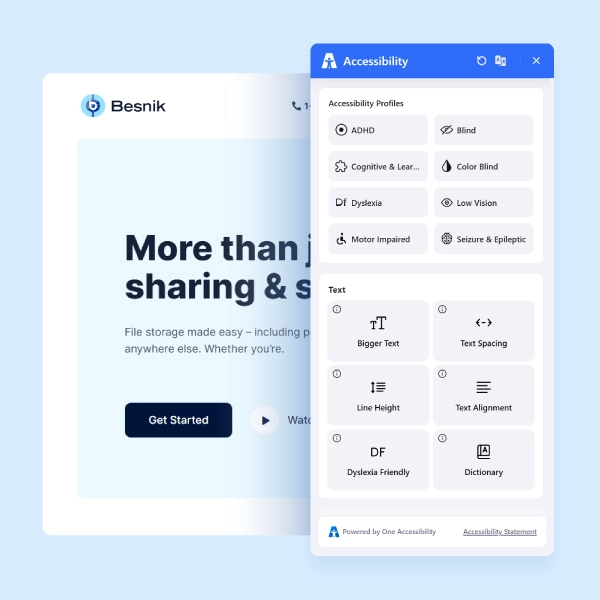
One Accessibility is a WordPress plugin built to help website owners achieve and maintain WCAG 2.2 Level AA compliance through a fully customizable accessibility widget.
- Works with Elementor, Gutenberg, Bricks, Beaver Builder, Divi, WPBakery
- Smart conditional presets for different pages
- Visual drag-and-drop editor, no coding required
- Default accessibility preset activates instantly on installation
- Aligned with WCAG 2.2 Level AA, the current W3C web accessibility standard
Text Resizing
Content remains functional at 200% zoom per WCAG 1.4.4.
High Contrast
Helps meet color contrast requirements under WCAG 1.4.3.
Keyboard Navigation
Core requirement across WCAG 2.2 Level A and AA.
Screen Reader Ready
Supports the Robust principle and proper ARIA implementation.
Reading Mask
Supports Understandable and Perceivable principles for cognitive accessibility.
Focus Indicators
Enhanced focus styling supports WCAG 2.4.7 and new 2.4.11 Focus Not Obscured.
Make Your WordPress Site WCAG 2.2-Ready
Join thousands of sites using One Accessibility to meet global accessibility standards — no coding required.