

Equality Act 2010 UK Accessibility Law
The Equality Act 2010 protects disabled people across the UK. It shapes how organisations build websites today. If you serve UK consumers, you carry a real legal duty.
Equality Act Requirements for Businesses in the UK
Parliament passed the Equality Act 2010 on 1 October 2010. The act merged over 100 earlier laws into one. It protects people from discrimination based on disability and other traits.
England, Scotland, and Wales all follow this act. Northern Ireland still follows the older Disability Discrimination Act 1995. Both laws push organisations toward the same digital accessibility goals.
The act does not name one specific web standard. Instead, it places a duty on organisations to make reasonable adjustments. Organisations must remove barriers that stop disabled users from using their services.
This duty works ahead of time. Organisations must plan for accessibility before problems happen. They cannot simply wait for a complaint before they fix a barrier.
“Accessible websites serve everyone better. They help older users, people with temporary impairments, and mobile users alike. Accessibility goes beyond meeting a legal threshold and builds experiences that genuinely work for every visitor.”
Equality Act 2010 and the Web Accessibility Framework
Equality Act 2010
UK law banning discrimination across England, Scotland, and Wales.
Section 20
Requires organisations to remove barriers and make reasonable adjustments.
PSBAR 2018
Public Sector Bodies Accessibility Regulations set WCAG 2.2 AA for government sites.
WCAG 2.2 AA
Widely used benchmark for demonstrating reasonable adjustments.
EHRC Enforcement
Equality and Human Rights Commission oversees compliance and complaints.
Who Does the Equality Act Apply To?
The Equality Act covers almost every organisation that provides goods or services in the UK, including public bodies and private businesses.
Organisations That Must Comply
- Public sector bodies, government departments, and local councils
- Private businesses of all sizes, across every sector
- Online shops and e-commerce platforms that sell to UK consumers
- Banking, finance, and insurance providers
- Charities and other third sector organisations
- Schools, colleges, and universities
Exemptions and Gray Areas
- Small businesses get no blanket size-based exemption
- Northern Ireland follows the DDA 1995, not the Equality Act
- Private clubs may fall outside the scope, depending on public access
Note: Unlike the BFSG, the Equality Act offers no carve-out for microenterprises. Size alone does not exempt an organisation from the reasonable adjustment duty.
Key Compliance Expectations
Private businesses face no single fixed national deadline. The reasonable adjustment duty applies on an ongoing basis.
| Requirement | Deadline or Status |
|---|---|
| Public sector websites and mobile apps | WCAG 2.2 AA required since 2018 |
| Public sector accessibility statements | Ongoing, monitored by GDS and CDDO |
| Private businesses, reasonable adjustments | No fixed deadline, duty applies now |
| New or updated commercial websites | Reasonable adjustments expected from launch |
Penalties for Non-Compliance
Ignoring the Equality Act carries real legal and reputational risk.
Unlawful Act Notices
The EHRC issues these for breaches of the duty.
Court Action
Disabled users can bring discrimination claims to court.
Public Naming
The CDDO can publicly name non-compliant public bodies.
Settlements
Several cases have settled out of court without a trial.
Brand Damage
Public non-compliance signals exclusion and harms trust.
What Equality Act Compliance Requires for Websites
Most organisations use WCAG 2.2 Level AA as the practical benchmark for reasonable adjustments.
Alternative Text
Images and icons need descriptive alt text for screen readers.
Captions and Transcripts
Videos need accurate captions and, where possible, transcripts.
Resizable Text
Enlarged text should not break the layout or hide content.
Color Contrast
Normal text needs 4.5:1; large text needs 3:1.
Equality Act Compared to Other Accessibility Standards
| Standard | Region | Applies To | Technical Baseline |
|---|---|---|---|
| Equality Act 2010 | UK, excluding NI | Public bodies and private businesses | WCAG 2.2 AA |
| Public Sector Bodies Regulations 2018 | UK | Public sector websites and apps | WCAG 2.2 AA |
| DDA 1995 | Northern Ireland | Public and private organisations | No codified web standard |
| EAA (EU Directive 2019/882) | EU | All EU member states | EN 301 549 and WCAG 2.1 AA |
| ADA | USA | US businesses, public and private | WCAG 2.1 AA, court interpreted |
| WCAG 2.2 AA | Global | Referenced by most national laws worldwide | The standard itself |
Equality Act Compliance Checklist
Content Accessibility
- All images carry appropriate, descriptive alt text
- Videos include captions and transcripts
- PDFs and downloadable documents stay accessible
- Headings follow a logical hierarchical order
- Color never serves as the only way to convey information
Visual Design
- Text to background contrast meets 4.5:1 minimum
- Large text meets 3:1 contrast ratio
- Content stays usable when text is enlarged
- Focus indicators stay clearly visible for keyboard users
Navigation and Interaction
- Every interactive element stays reachable via keyboard
- Skip navigation links bypass repeated menus
- No keyboard traps exist anywhere on the site
- Navigation stays consistent across every page
Forms and Technical
- Every form field carries a visible, descriptive label
- Error messages identify the problem and the fix
- The page language is defined in the HTML
- An accessibility statement is published on the site
Meet Equality Act Expectations with One Accessibility
One Accessibility helps website owners work toward WCAG 2.2 AA, supporting the duty to make reasonable adjustments under the Equality Act.
- Works with Elementor, Gutenberg, Bricks, Beaver Builder, Divi, and WPBakery
- Smart conditional presets for different pages
- Visual drag-and-drop editor, no coding required
- Default accessibility preset activates instantly on installation
- Built around WCAG 2.2 AA, a recognised reasonable adjustment benchmark
Text Resizing
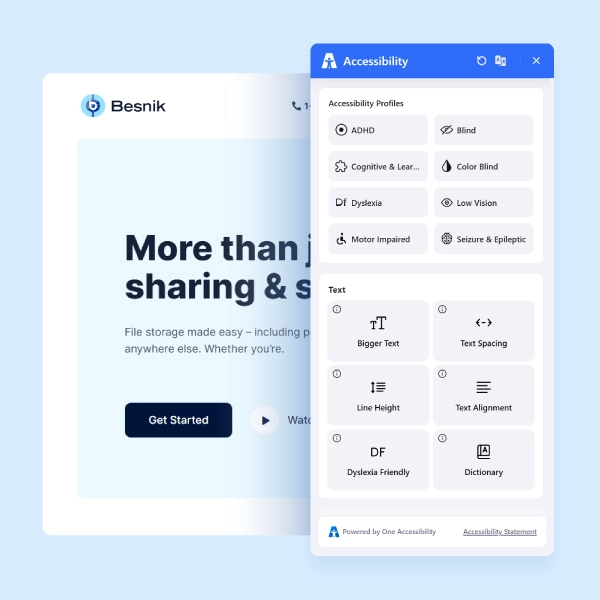
Visitors can increase or decrease text size to their comfortable reading level.
High Contrast
Toggle high contrast mode for visual impairments or light sensitivity.
Keyboard Navigation
Enhanced keyboard navigation for users who cannot use a mouse.
Screen Reader Ready
Markup compatible with JAWS, NVDA, VoiceOver, and other screen readers.
Reading Mask
A reading guide overlay that helps users with dyslexia follow lines of text.
Instant Activation
Default preset activates on install and improves your site immediately.
Make Your WordPress Site Equality Act 2010-Ready
Join thousands of sites using One Accessibility to meet global accessibility standards — no coding required.