


AODA: Accessibility for Ontarians with Disabilities Act
The Accessibility for Ontarians with Disabilities Act (AODA) is Ontario's landmark accessibility law, enacted to make the province fully barrier-free. If your organization operates in Ontario with one or more employees, compliance is a legal requirement, not optional.
AODA Requirements for Organizations in Ontario
The Accessibility for Ontarians with Disabilities Act (AODA) became law on June 13, 2005. It was introduced to identify, remove and prevent barriers for people with disabilities across every aspect of life in Ontario, from workplaces and public spaces to websites and digital services.
The AODA applies to all levels of government, all nonprofits and all private sector businesses in Ontario with one or more employees, including full-time, part-time, seasonal and contract workers. With over 400,000 organizations obligated, it is one of the most broadly scoped accessibility laws in the world.
For websites specifically, the AODA's Information and Communications Standard requires public-facing web content to meet WCAG 2.0 Level AA, a deadline that passed on January 1, 2021, for organizations with 50 or more employees and all public sector bodies.
“The AODA aims to build on the Ontario Human Rights Code to make Ontario fully accessible by 2025, covering not just physical spaces, but every digital experience, communication and service that Ontarians rely on.”
The AODA's Five Accessibility Standards
The AODA is built around five core standards under the Integrated Accessibility Standards Regulation (IASR), each covering a different aspect of accessible life in Ontario.
Customer Service
Organizations must provide accessible customer service and allow assistive devices, support persons and service animals.
Information & Communications
Websites, apps, digital documents and communications must be accessible, meeting WCAG 2.0 AA for web content.
Employment
Accessible recruitment, onboarding, performance management and workplace accommodation processes for employees with disabilities.
Transportation
Transit providers must offer accessible vehicles, stops, stations and passenger communications.
Design of Public Spaces
New builds and major renovations must include accessible parking, pathways, washrooms, rest areas and tactile signage.
Who Does the AODA Apply To?
The AODA applies to virtually every organization operating in Ontario. Compliance levels and reporting requirements scale based on organization size and type.
Organizations That Must Comply
- All Ontario government ministries and agencies
- All public sector organizations, regardless of size
- All private businesses and nonprofits with 1+ employees
- Organizations with 50+ employees — full WCAG 2.0 AA for all public web content
- Organizations with 20+ employees must file accessibility compliance reports
- Applies to all websites, mobile sites, apps and digital documents
Compliance Tiers by Organization Size
- 1–19 employees: Basic AODA requirements apply; no compliance reporting required
- 20–49 employees: Must file accessibility compliance reports every 3 years
- 50+ employees (private/nonprofit): Full web WCAG 2.0 AA compliance required; reporting mandatory
- All public sector bodies: Full compliance at all scales; strictest reporting obligations
- Pre-2012 web content is exempt from retroactive requirements
Key AODA Compliance Deadlines
The AODA has a phased compliance schedule spanning from 2010 to 2025, with web accessibility requirements and reporting deadlines that continue to apply today.
| Requirement | Who It Applies To | Deadline | Status |
|---|---|---|---|
| Public sector websites, WCAG 2.0 Level A | Public sector organizations | Jan 1, 2014 | Past Due |
| Public sector websites, WCAG 2.0 Level AA | Public sector organizations | Jan 1, 2021 | Past Due |
| Private/nonprofit websites, WCAG 2.0 Level AA (50+ employees) | Private sector, 50+ employees | Jan 1, 2021 | Past Due |
| Accessibility compliance report (businesses/nonprofits) | 20+ employees | Dec 31, 2026 | Upcoming |
| Accessibility compliance report (public sector) | All public sector bodies | Dec 31, 2025 | Past Due |
| Full barrier-free Ontario, all sectors | All organizations | Jan 1, 2025 | Target |
Penalties for Non-Compliance
The AODA carries substantial financial penalties for non-compliance and beyond fines, organizations risk mandatory audits, court orders and significant reputational damage.
$100K/day
Maximum daily fine for corporations that continue to violate AODA standards.
$50K/day
Maximum daily fine for individuals, unincorporated organizations and directors/officers.
Mandatory Audit
The government may order compliance audits and inspections of any non-compliant organization.
Court Orders
Enforcement orders and court directives requiring immediate accessibility improvements.
Public Reporting
Violations may be publicly reported, causing lasting brand and reputational damage.
What AODA Compliance Requires for Websites
The Information and Communications Standard requires public-facing web content to meet WCAG 2.0 Level AA, organized under four core principles.
Text Alternatives
All non-text content, images, icons and buttons must have descriptive text alternatives for screen readers and assistive tools.
Time-Based Media
Pre-recorded audio and video must include captions and audio descriptions. Live video must have real-time captions.
Adaptable Content
Content must be presentable in different ways without losing information or structure, including assistive technology rendering.
Color Contrast
Minimum 4.5:1 contrast ratio for normal text; 3:1 for large text. Content must not rely on color alone to convey meaning.
AODA vs. Other Accessibility Laws
Understanding how the AODA fits within the broader global landscape of accessibility legislation.
| Law | Region | Applies To | Web Standard |
|---|---|---|---|
| AODA | Ontario, Canada | All organizations in Ontario with 1+ employees | WCAG 2.0 AA |
| ACA (Accessible Canada Act) | Canada | Federal government and federally regulated entities | WCAG 2.1 AA |
| BFSG | Germany | Private B2C businesses in Germany | WCAG 2.1 AA (EN 301 549) |
| EAA (EU Directive 2019/882) | EU | All EU member states, private sector B2C | WCAG 2.1 AA |
| ADA | USA | US businesses, federal and commercial | WCAG 2.1 AA (court-interpreted) |
| WCAG 2.0 / 2.1 Level AA | Global | Referenced by accessibility laws worldwide | The standard itself |
AODA Website Compliance Checklist
Use this checklist to evaluate your website's AODA readiness.
Content & Media
- All images have meaningful, descriptive alt text
- Videos have accurate captions and transcripts
- Audio content has a text alternative
- PDFs and documents are accessible or available in an accessible format on request
- Headings used in correct hierarchical order (H1 → H2 → H3)
Visual Design
- Text contrast meets 4.5:1 minimum against its background
- Large text meets a 3:1 contrast ratio minimum
- Content is usable when the browser text is resized to 200%
- Color is not the only means of communicating information
- Focus indicators are visible when navigating with the keyboard
Navigation & Keyboard
- All interactive elements reachable and usable via keyboard
- Skip navigation link present to bypass repeated menus
- No keyboard traps — users can navigate freely in and out
- Navigation is consistent across all pages
- Page titles are unique and descriptive for every page
Forms & Reporting
- All form fields have visible, programmatically associated labels
- Error messages clearly identify the issue and how to fix it
- The accessibility feedback mechanism has been published on the site
- Accessibility compliance report filed (if 20+ employees)
- Accessibility policy documented and available publicly
Meet AODA Requirements with One Accessibility
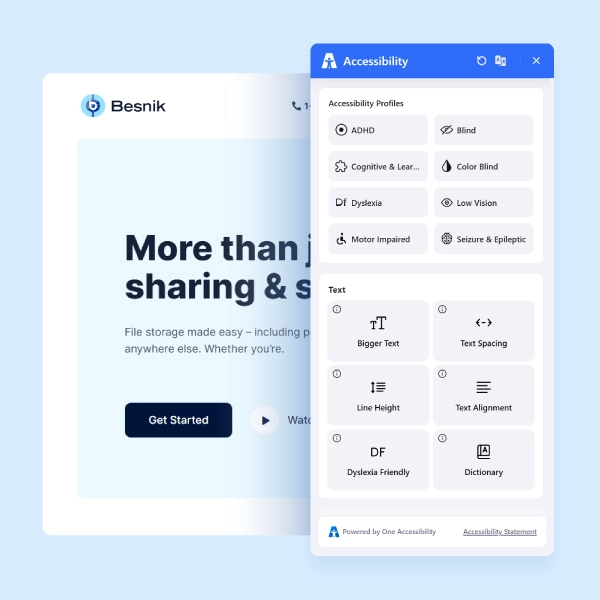
One Accessibility is a WordPress plugin designed to help website owners achieve and maintain accessibility compliance, including the WCAG 2.0 AA standards required under the AODA's Information and Communications Standard.
- Works with Elementor, Gutenberg, Bricks, Beaver Builder, Divi, WPBakery
- Smart conditional presets, different settings for different pages
- Visual drag-and-drop editor, no coding required
- The default accessibility preset activates instantly on installation
- Aligned with WCAG 2.0 AA, the AODA web compliance baseline
Text Resizing
Visitors can increase or decrease text size to their comfortable reading level.
High Contrast
Toggle high contrast mode for users with visual impairments or light sensitivity.
Keyboard Navigation
Enhanced keyboard navigation support for users who cannot use a mouse.
Screen Reader Ready
Fully compatible markup for JAWS, NVDA, VoiceOver and other screen readers.
Reading Mask
A reading guide overlay that helps users with dyslexia follow lines of text.
Instant Activation
Default preset activates on install — your site improves accessibility immediately.
Frequently Asked Questions
Common questions about AODA compliance, who it affects and what organizations need to do.
Make Your WordPress Site AODA-Ready
Join thousands of sites using One Accessibility to meet global accessibility standards — no coding required.